
This page is for purchasing our custom developed software. We are using this work, to hopefully support the expenses of building our retreat center project.
If we get enough interest in the software we provide here, we will be directing the funding towards the retreat project. Please support our efforts below!
Before downloading, please review the license agreement at the bottom of the screen. No refunds because there is a trial version.
AltTabReorder (Download the Trial Version Here!)
Or download the trial version directly from Gumroad
Purchase the software securely from Gumroad at this link: https://makiwave17.gumroad.com/l/zvzlft
This software is excellent for productivity. Below is an outline of the capabilities, and amazing features! Currently works only on x64 compatible windows OS. It has built in support for multiple monitors as well.
Feature 1: allows for the ability to reorder all of the windows. How often did you wish you could reorder the Alt-Tab element windows?
This allows you to group together the windows you need in a specific order.
It allows you to have your logically related windows… together in your specific workflow!
All features below also include a window for going directly to the desktop as well, which is a feature not native to windows from the normal Alt-Tab screen!

Windows does not allow for this kind of behavior and locks you into the random order of when you open windows. This particular feature is loved by those that use this software!
Feature 2: Right Click and Zoom. How many times have you wondered what exact window you were looking at when using the normal Alt-Tab feature in windows?
Now you can ZOOM in to select the right window.
This is especially helpful when you have a lot of directory sessions open and want to organize those windows.

Feature 3: How many times did you wish you could resize the windows in the Alt-Tab screen? We allow for full control over the size of those windows.
You can make them smaller to allow more windows on one screen.
Or you can make them larger if you are working with a smaller set of windows. This is good when you want to see the details of the window better.
Or you can make all windows larger… and scroll up and down to see the details of every window.
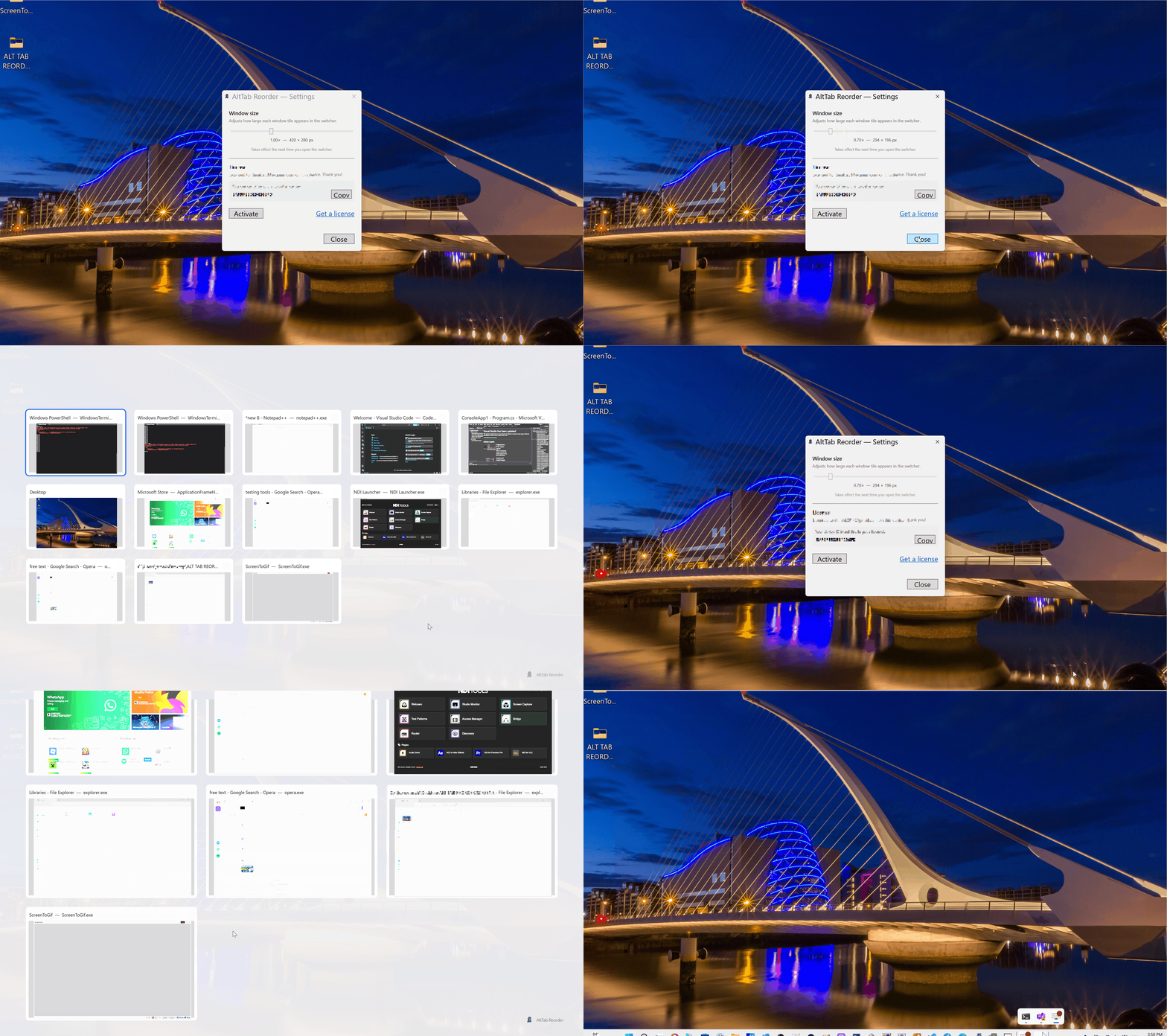
Feature 4: Allows for fast-direct window clicking navigation.
Some features in windows allow this same ability.
The performance with our version is great with this feature.

Feature 5: Allows for the easy closing of windows. When you hover over the top right corner of a window, you will see a bright red X which you can click to close the open window.

Feature 6: The normal Alt-Tab navigation feature is also still available as well.
The only difference is the starting point is always the very first window.
Unlike in native windows, when it jumps immediately to position 2. Allowing non selection from position one is much more intuitive!
Also, windows no longer randomly reorder when doing Alt-Tab. They always stay put, unless you manually reorder them yourself.

PROPRIETARY SOFTWARE LICENSE AGREEMENT (EULA)
IMPORTANT: BY DOWNLOADING, INSTALLING, OR USING THE SOFTWARE, YOU AGREE TO BE BOUND BY THIS AGREEMENT.
1. PARTIES & DEFINITIONS
- Licensor: [Your Company Name], with its principal place of address at [Your Address] (“Licensor”).
- Licensee: The individual or entity acquiring the license under this Agreement (“Licensee”).
- Software: The proprietary software program known as [Software Name], including any associated documentation, updates, and error corrections.
2. GRANT OF LICENSE
Subject to the terms of this Agreement, Licensor grants Licensee a limited, non-exclusive, non-transferable, revocable license to use the Software solely for Licensee’s internal business purposes. Licensee shall not sublicense, rent, lease, or distribute the Software to any third party.
3. RESTRICTIONS
Licensee shall not:
- Reverse engineer, decompile, disassemble, or otherwise attempt to discover the source code of the Software.
- Modify, adapt, or create derivative works based upon the Software.
- Remove, alter, or obscure any proprietary notices (including copyright and trademark notices) of Licensor.
4. INTELLECTUAL PROPERTY RIGHTS
The Software is licensed, not sold. Licensor retains all right, title, and interest in and to the Software, including all intellectual property rights therein.
5. DISCLAIMER OF WARRANTIES
THE SOFTWARE IS PROVIDED “AS IS”, WITHOUT WARRANTY OF ANY KIND, EXPRESS OR IMPLIED, INCLUDING BUT NOT LIMITED TO THE WARRANTIES OF MERCHANTABILITY, FITNESS FOR A PARTICULAR PURPOSE, AND NONINFRINGEMENT.
6. LIMITATION OF LIABILITY
IN NO EVENT SHALL LICENSOR BE LIABLE FOR ANY SPECIAL, INCIDENTAL, INDIRECT, OR CONSEQUENTIAL DAMAGES WHATSOEVER ARISING OUT OF THE USE OF OR INABILITY TO USE THE SOFTWARE.
7. TERMINATION
This Agreement is effective until terminated. Licensor may terminate this Agreement immediately if Licensee breaches any provision. Upon termination, Licensee must cease all use of the Software and destroy all copies in its possession.